Ingredient Swap Issues

Baldhead Brewer

Apprentice
Joined
Sep 20, 2013
Messages
26
Reaction score
0
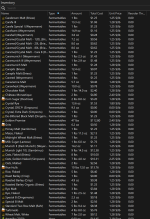
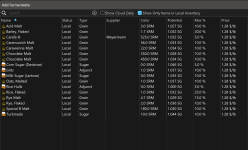
I am upgrading to Beersmith 4 and am having some issues swapping ingredients in recipes from ingredients in my inventory. I have 56 "Fermentables" in my locally saved inventory. I select an ingredient in my recipe and click the 'Substitute' button. I deselect 'Show Cloud Data' and enable 'Show only items in local inventory.' The list I am presented with is only 17 items long, and doesn't include any of the ingredients I want to swap in. I never had this issue with Beersmith 3 and I'm not sure what I am doing differently.

EDIT: I also get this same issue when I attempt to add any ingredients, not just substitutions. In this case, if I add a fermentable ingredient, I only see the 17 items out of the 56 fermentables in my inventory.
 

Attachments
  • Screenshot 2026-06-22 134030.png
    Screenshot 2026-06-22 134030.png
    144.7 KB · Views: 2
  • Screenshot 2026-06-22 134227.png
    Screenshot 2026-06-22 134227.png
    339.1 KB · Views: 2
Last edited:
The problem may be with the actual ingredient table. Basically when you go to the choose ingredient dialog it takes the baseline ingredient table (be it hops, grains, etc...) and then uses the inventory table to "filter" those results by name.

So for example if you imported a bunch of inventory hops from BeerSmith 3, and those inventory items have no exact name match in the current hops table, they will not be displayed. Only hops that are in the Ingredient->hops table that also have an entry in inventory will be shown.
 
So the ingredient has to be both in my list of known ingredients, and in my inventory, for the inventory item to show up when selecting an ingredient?
 
That is correct if you are filtering items by current inventory. The actual hops (or other ingredient) entry is in the Ingredients->Hops table. The inventory table merely stores current inventory and when you filter by inventory it filters matching items that are in the hops table.
 
I am upgrading to Beersmith 4 and am having some issues swapping ingredients in recipes from ingredients in my inventory. I have 56 "Fermentables" in my locally saved inventory. I select an ingredient in my recipe and click the 'Substitute' button. I deselect 'Show Cloud Data' and enable 'Show only items in local inventory.' The list I am presented with is only 17 items long, and doesn't include any of the ingredients I want to swap in. I never had this issue with Beersmith 3 and I'm not sure what I am doing differently.

EDIT: I also get this same issue when I attempt to add any ingredients, not just substitutions. In this case, if I add a fermentable ingredient, I only see the 17 items out of the 56 fermentables in my inventory.
It sounds like BeerSmith 4 may be applying additional filters or ingredient categories behind the scenes. I'd double-check that your inventory items are assigned to the correct fermentable type and try refreshing or rebuilding the local inventory database. Hopefully someone who's experienced the same issue in BS4 can confirm.
 
The best way I can explain this is that BeerSmith starts with the list of ingredients in your local ingredient tables (Hops for instance). Then when you check the box to "show items in inventory" it applies the inventory as a filter to the local ingredients table, matching by name and type.

So for instance if you have a hop like "Hoptastic" in your inventory that is not in Ingredients->Hops table it will not show up when you are adding or substituting ingredients. You likely have items in your inventory list that don't have an exact name match in the Ingredients->Fermentables list (per your eample) which is why only 17 items show up.
 
I am upgrading to Beersmith 4 and am having some issues swapping ingredients in recipes from ingredients in my inventory. I have 56 "Fermentables" in my locally saved inventory. I select an ingredient in my recipe and click the 'Substitute' button. I deselect 'Show Cloud Data' and enable 'Show only items in local inventory.' The list I am presented with is only 17 items long, and doesn't include any of the ingredients I want to swap in. I never had this issue with Beersmith 3 and I'm not sure what I am doing differently.
EDIT: I also get this same issue when I attempt to add any ingredients, not just substitutions. In this case, if I add a fermentable ingredient, I only see the 17 items out of the 56 fermentables in my inventory.
I ran into something similar after moving to BeerSmith 4 and at first thought my inventory hadn’t imported properly. Definitely confusing when the inventory shows everything but the recipe screen only gives you a small part of it.
 
I am upgrading to Beersmith 4 and am having some issues swapping ingredients in recipes from ingredients in my inventory. I have 56 "Fermentables" in my locally saved inventory. I select an ingredient in my recipe and click the 'Substitute' button. I deselect 'Show Cloud Data' and enable 'Show only items in local inventory.' The list I am presented with is only 17 items long, and doesn't include any of the ingredients I want to swap in. I never had this issue with Beersmith 3 and I'm not sure what I am doing differently.

EDIT: I also get this same issue when I attempt to add any ingredients, not just substitutions. In this case, if I add a fermentable ingredient, I only see the 17 items out of the 56 fermentables in my inventory.
That sounds frustrating! It might be a data synchronization or grouping issue between versions. Have you checked if your local inventory is fully activated as a separate profile, or if there's an active type filter (like extract vs. grain) hiding the rest of your fermentables?
 
Back
Top