Mash volume different on Mobile vs. PC

Toy4Rick

Grandmaster Brewer
Joined
Dec 28, 2011
Messages
284
Reaction score
1
Hey all,

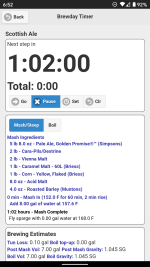
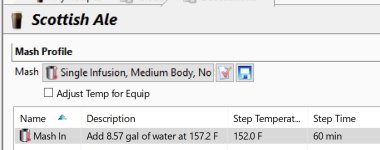
I have a recipe saved to the cloud, on my laptop, it shows 8.57 gals of water for mash, when I open the same recipe on my Android, mash volume is 8.0 gals.

The water temp is also not the same, close but still off, 157.2 vs. 157.6

When I open the recipe on my phone, I then saved the Equipment profile locally, then reselected it to the recipe to see if that would help, it didn't

Both apps are running current versions

Thoughts?
 

Attachments

  • Laptop.jpg
    Laptop.jpg
    77.5 KB · Views: 948
  • Android.png
    Android.png
    262.4 KB · Views: 934
I would like to help, but I don't have the mobile app and cannot verify or try to replicate your issue.  I would suspect that with little response, other people are not having the issue but that is just speculation.  Your best bet is to write directly to Brad for assistance.

Aside from that, screen shots don't really do much for getting help.  It doesn't show the backing information which leads to the volume numbers you have in the pictures.  If it were just a desktop issue, I would say export a recipe demonstrating the issue as a .bsmx file and posting that.  With the mobile app, I am not sure if you can do the same with the recipe from the app.  Maybe an app user can chime in to give guidance on that aspect of trying to see how the numbers were calculated.
 
Sorry you haven't found a solution yet. I've checked this thread every time there is a new post to see if someone offers an answer but like Oginme I really don't use the app even though I have it on my iPhone. I was really disappointed with the app as soon as I downloaded it several years ago and gave up trying to do anything other than use it for the brew day timer. I print out the brew steps from my laptop and refer to that during a session.
 
Thanks for the replies

I have emailed Brad directly, 3 weeks ago and nothing

Since I don't print recipes I use my phone on brew day.

Been using the SW for about 9 years so it's not foreign to me, just can't see why the volumes are off

Oh well, I'll keep looking

 
Ok

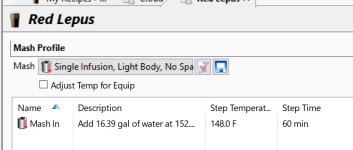
Built a new recipe, saved it to the cloud... here is my mash volume in the BS Windows, 16.39 gals of water. Saved and closed

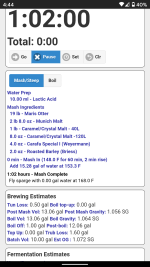
Opened the same recipe from the cloud on my Android phone and now the mash volume is 15.28 gals of water

Recipe also attached

There are a couple other minor differences as well to note:
Post Mash volume, Windows 13.08, Android 13.06
Post Boil, Windows 12.08, Android 12.06

Please @Brad Smith, chime in here


Attachments

  • BS Windows.jpg
    BS Windows.jpg
    73.7 KB · Views: 842
  • Screenshot_20201213-164422.png
    Screenshot_20201213-164422.png
    283 KB · Views: 827
  • Red Lepus.bsmx
    Red Lepus.bsmx
    33.2 KB · Views: 455
For the interested parties, Brad saved the day

The BIAB grain absorption setting on my phone was set to .9600 rather than the default .586

Once I set it back, my Phone and PC are nearly identical - Phone is off by .02 gals but I can live with that

Doesn't seem right to me that BIAB setting is affecting All Grain profile but hey, who am I to question that

How/when the setting got changed... I'm sure it was me somewhere along the way but I sure don't remember doing it

Brew on  8)
 
For the interested parties, Brad saved the day

The BIAB grain absorption setting on my phone was set to .9600 rather than the default .586

Once I set it back, my Phone and PC are nearly identical - Phone is off by .02 gals but I can live with that

Doesn't seem right to me that BIAB setting is affecting All Grain profile but hey, who am I to question that

How/when the setting got changed... I'm sure it was me somewhere along the way but I sure don't remember doing tomato apk it

Brew on 8)
Yes i see
 
This kind of mismatch between mobile and PC usually comes down to rounding precision, unit handling, or slight differences in how the apps sync equipment profiles from the cloud, which is common in many cross-platform tools; you see similar behavior in games too, where the same world or settings can display slightly differently on mobile versus desktop versions, especially in sandbox games like Minecraft that run on multiple platforms minecrftdescargar.mx — for BeerSmith specifically, I’d double-check that both devices are using identical units, grain absorption settings, and the exact same equipment profile revision, as even tiny differences can affect mash volume and temperature readouts.
 
Last edited:
Hey all,

I have a recipe saved to the cloud, on my laptop, it shows 8.57 gals of water for mash, when I open the same recipe on my Android, mash volume is 8.0 gals.

The water temp is also not the same, close but still off, 157.2 vs. 157.6

When I open the recipe on my phone, I then saved the Equipment profile locally, then reselected it to the recipe to see if that would help, it didn't

Both apps are running current versions of inat box indir apk son sürüm.

Thoughts?
Mobile phones typically apply aggressive compression, loudness normalization, and speaker optimization to make sound clearer on small built-in speakers, which can cause mashups to feel louder, flatter, or less dynamic. On PCs, audio output depends heavily on sound cards, drivers, system equalizers, and external speakers or headphones, resulting in a wider dynamic range and more noticeable differences between tracks in a mash.
 
For the interested parties, Brad saved the day

The BIAB grain absorption setting on my phone was set to .9600 rather than the default .586

Once I set it back, my Phone and PC are nearly identical - Phone is off by .02 gals but I can live with that

Doesn't seem right to me that BIAB setting is affecting All Grain profile but hey, who am I to question that

How/when the setting got changed netmirror ios... I'm sure it was me somewhere along the way but I sure don't remember doing it

Brew on 8)
Mash volume can differ between mobile devices and PCs due to variations in hardware, operating systems, and audio processing settings. Mobile devices often use built-in audio enhancements, compression, or automatic volume leveling to optimize sound for small speakers and headphones, which can make audio seem louder or more balanced.
 
For the interested parties, Brad saved the day

The BIAB grain absorption setting on my phone was set to .9600 rather than the default .586

Once I set it back, my Phone and PC are nearly identical - Phone is off by .02 gals but I can live with that

Doesn't seem right to me that BIAB setting is affecting All Grain profile but hey, who am I to question that

How/when the setting got changed driver booster... I'm sure it was me somewhere along the way but I sure don't remember doing it

Brew on 8)
It’s a common issue in cross-platform tools, and you’ll notice similar behavior in games, where the same world or settings can appear slightly different on mobile compared to desktop versions—especially in sandbox-style games.
 
For the interested parties, Brad saved the day

The BIAB grain absorption setting on my phone was set to .9600 rather than the default .586

Once I set it back, my Phone and PC are nearly identical - Phone is off by .02 gals but I can live with that

Doesn't seem right to me that BIAB setting is affecting All Grain profile but hey, who am I to question that

How/when the game setting got changed... I'm sure it was me somewhere along the way but I sure don't remember doing it

Brew on 8)
Yes, I agree. This kind of mismatch happens a lot when the same product runs on different platforms. Each device has its own limitations, performance handling, and optimization rules. That’s why results can feel inconsistent even when everything is technically set up the same. Sandbox-style games are a good example, where experience can vary depending on where you play.
 
Differences between mobile and desktop results usually come from small technical factors like rounding behavior, unit conversions, or how each platform syncs data from the cloud. This is pretty common in cross-platform software, where the same profiles or settings can behave slightly differently depending on the device.


You see similar patterns in gaming as well — the same environment or configuration might display minor variations between mobile and PC versions due to performance optimizations or platform limitations. It’s something I’ve noticed not just in tools, but also when using entertainment apps like tomao animes, where features may feel a bit different across devices.


For BeerSmith specifically, I’d recommend verifying that both versions use exactly the same unit system, equipment profile, and grain absorption settings. Even small mismatches in those parameters can easily lead to noticeable differences in volume or temperature calculations.
 
Differences between mobile and desktop results usually come from small technical factors like rounding behavior, unit conversions, or how each platform syncs data from the cloud. This is pretty common in cross-platform software, where the same profiles or settings can behave slightly differently depending on the device.


You see similar patterns in gaming as well — the same environment or configuration might display minor variations between mobile and PC versions due to performance optimizations or platform limitations. It’s something I’ve noticed not just in tools, but also when using entertainment apps like tomao animes, where features may feel a bit different across devices.


For BeerSmith specifically, I’d recommend verifying APK Dana Game that both versions use exactly the same unit system, equipment profile, and grain absorption settings. Even small mismatches in those parameters can easily lead to noticeable differences in volume or temperature calculations.
Mobile devices often use built-in speakers with aggressive volume normalization and compression to prevent distortion, which can make effects like mash or impact sounds seem louder or flatter. On PC, sound is processed through system mixers, sound cards, and external speakers or headphones, giving more dynamic range but also making volume levels depend on user settings and drivers.
 
Back
Top