
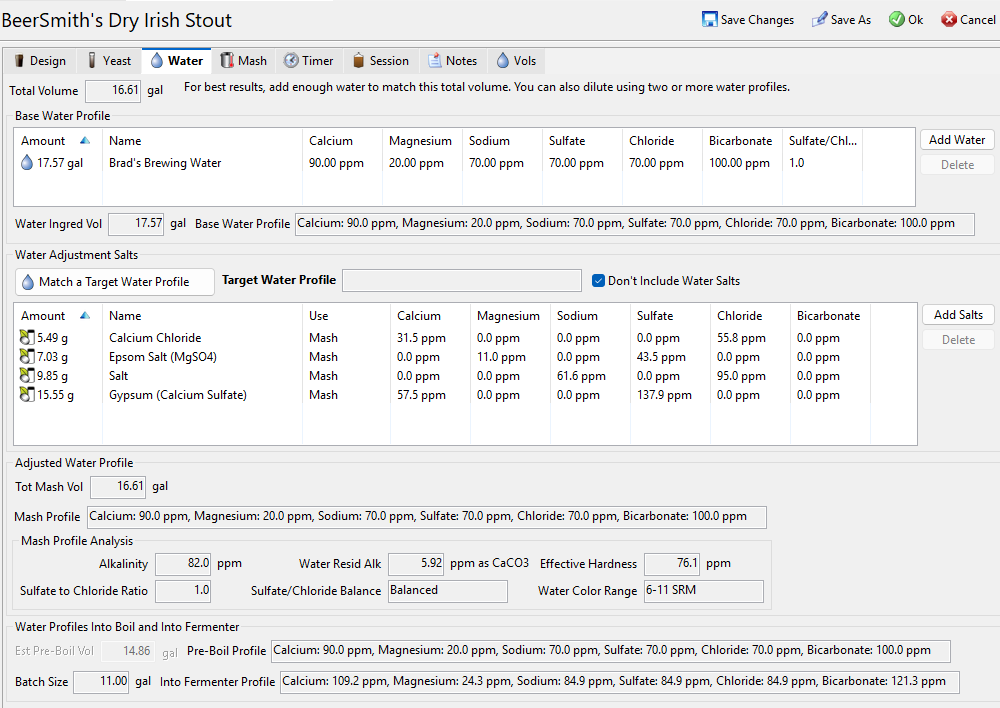
This week I take a close look at the many changes to the water profile features in BeerSmith 4. The water profile estimation and matching was significantly overhauled in the new version of BeerSmith to make it easy to use and more accurate.
Water Salt Forms and Molecular Weights
In BeerSmith 3 most of the water salt additions were in their dry (annhydrous) form. Unfortunately, Calcium Chloride was calculated using numbers for the hydrous form. Since most home and professional brewers use typical water salts in their dry form, for BeerSmith 4 the Calcium Chloride numbers for the annhydrous form are now used.
In addition, I calculated all of the water salt factors from scratch starting with their molecular weights. Calcium Carbonate (chalk), for example, had numbers that were slightly off and are now updated. This gives more accurate results across the board when doing water matching or water salt calculations. In addition the chemistry on items like Chalk and Pickling lime were altered to reflect the way the ions chemically break down during the mash.
New Water Adjustment Salts and Features
For some time brewers have been asking that pickling lime be added as an option in BeerSmith. I included this in BeerSmith 4 along with the warning that it is best added after the start of the mash to prevent precipitation. Magnesium Chloride (MgCl) was also added as an option for salts though it is less commonly used at the homebrew level.
When matching water salts in a recipe using the Match a Target Water Profile button I included new checkboxes to exclude Pickling Lime or exclude Chalk since it is rare that both are used together, and chalk often dissolves poorly in water. In a recent update I also added a box for excluding Magnesium Chloride when matching water profiles as many homebrewers don’t have access to that.
How to Match a Water Profile
Matching a water profile is as simple as adding your base water profile on the water tab with the correct overall volume, and then using the Match a Target Water Profile button to pick a target water profile. BeerSmith 4 will calculate the best fit for that water profile and add the salts needed to the recipe when you press OK. There is a complete video tutorial of the process here if you want to see how it is done.
In the recipe builder there is also a checkbox to hold sparge salts until the boil on the water tab which is something many brewers asked for, as the sparge salts do not substantially affect the mash chemistry. This option will only show up if you have a separate sparge step. For brew in a bag or no-sparge mash profiles the option is hidden as there is no sparge salt to combine.
Water Profiles into the Boil and Fermenter
While most all grain brewers are focused on matching a given water profile in the mash to optimize their mash chemistry, BeerSmith 4 now also estimates your mash profile post-boil and also into the fermenter by accounting for boil off and other losses. This is a nice feature for those who want to understand what the water profile looks like in the finished beer.
Water Profiles for Extract, Mead, Cider, Seltzer and Wines
Extract brewers often use a neutral base water and rely on the concentrated malt extract to get the water profile about right. However you can now adjust water profiles for extract brews from the water tab to get more control over your beer.
While mead, cider, seltzer and wine makers are not often water-focused, clearly the water you use has a large impact on the finished product. BeerSmith 4 lets you use the same water matching tools an all-grain brewer uses. For these type of beverages, BeerSmith 4 attempts to match the chosen water profile into the fermenter. It therefore estimates the salts needed when making your mead, wine or cider with the goal of achieving that profile in the fermenter. This should correspond well with the water profile in the finished product, other than possible chemical changes brought on by fermentation.
Mash pH and Adjustment Tools
The updated water calculations mentioned above all feed directly into the mash pH estimation and mash pH adjustment tools in BeerSmith 4, shown on the mash tab. These tools have been highly simplified so that the estimated pH is calculated automatically and you can adjust to a target pH using one of two buttons: Adjust Acid from Estimated pH and Adjust Acid from pH Measurement.
I have a separate article describing how to use these two buttons in detail here as well as a video tutorial showing mash pH adjustment here, but the new system lets you easily estimate the acid needed for a preliminary and final pH adjustment while mashing. Also I changed the default model for pH estimation and adjustment to the BW Model which has generally been more accurate for most brewers than the older MPH model. You can set the model used in your equipment profile if you want to use one over the other on a consistent basis.
That’s a quick overview of the new water profile updates and features in BeerSmith 4. Thanks for joining me on the BeerSmith Home Brewing Blog. If you want to take the guesswork out of brewing, please try my BeerSmith 4 recipe software from BeerSmith.com. Be sure to sign up for my newsletter or my podcast (also on itunes and youtube) for more great tips on homebrewing.


















The recalculation of every salt factor from molecular weights is the kind of behind-the-scenes work most tools never bother with — switching Calcium Chloride to the anhydrous numbers alone will quietly fix a lot of saved recipes. The post-boil and fermenter profile estimation is a nice touch too; most water calculators stop at the mash. As someone who builds an all-in-one AI creative studio (MakeAIVideo, makeaivideo.app), I have a lot of respect for this level of polish on a single tool — accuracy before features. The sparge-salt hold-until-boil checkbox will get heavy use on my next all-grain brew day.